You need a landing page by tomorrow. Not a whole website—just one page: a hero section, three bullet points, a signup form, and a footer. WordPress would take an hour just to install and configure. Webflow is overkill. Carrd is the sweet spot: a one-page site builder that launches a professional-looking page in under 40 minutes for $19/year.
We've used Carrd to build launch pages for SaaS products, event signups, and personal portfolios. This is the exact workflow we follow—template selection, section-by-section customization, form integration, domain connection, and the three tweaks that separate a beginner page from one that actually converts.
Why Carrd Over the Alternatives?
Carrd isn't for every project. It's specifically for single-page sites. If you need a blog, multiple pages, or e-commerce, this isn't your tool. But for a landing page—one focused, high-converting page—Carrd beats the competition on three dimensions:
| Tool | Cost/Year | Learning Curve | Best For |
|---|---|---|---|
| Carrd Pro | $19 | Minimal (10 min) | Single-page landing, portfolio, link-in-bio |
| Webflow | $168+ | Steep (hours to days) | Multi-page sites, custom design |
| Unbounce | $132+ | Moderate | High-volume A/B testing, conversion focus |
| GitHub Pages (static) | Free | Requires HTML/CSS | Developers, personal projects |
Carrd's value is the 80/20: you get 80% of Webflow's design quality at 20% of the cost and learning time. The trade-off is that you can't build a 10-page site—and you don't need to, because a landing page should be one page.
The Workflow: Build in This Order, Not Randomly
Most people open Carrd and start dragging elements around. Don't do that. Build from top to bottom in this specific order—it cuts your build time in half because you're not re-adjusting layout as you go.
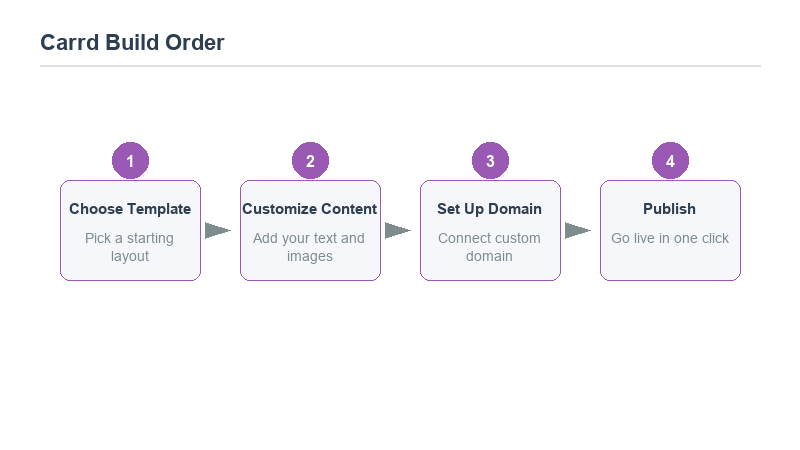
1. Pick a template that matches your content length. Carrd has 80+ templates. Don't pick the most visually impressive one—pick the one with the same number of sections as your content plan. A 5-section template with 3 sections of content will leave you deleting more than you build. Match the template to your content structure first, then customize the visuals.
2. Set your brand colors before touching any text. In the Theme panel, set your primary color, secondary color, and background color. Every element on the page inherits these. If you change colors after building, you'll have to re-adjust shadows, buttons, and text contrast. Do this first.
3. Write the hero section last. Counterintuitive, but true. The hero (headline + subheadline + CTA) is the hardest part and the one you'll rewrite 5 times. Build everything else first—the features, the social proof, the FAQ—then come back to the hero with the context of what the page actually says. Your headline will be sharper.
4. Add the form, not the other way around. Don't design around a form you haven't connected yet. Build the page, then drop in the form element, size it to fit the space. Carrd's form element works with Mailchimp, ConvertKit, Google Sheets, and 20+ services via webhooks.
5. Preview on mobile before publishing. Carrd is mobile-responsive, but "responsive" doesn't mean "good." Toggle the mobile preview (the phone icon in the top bar) and check: does your headline fit? Does your CTA button look tappable? Are your images too tall? Most Carrd landing pages lose conversions on mobile because nobody checked the mobile view.
The Three Tweaks That Actually Convert
A template Carrd page looks fine. But "fine" converts at 1–2%. These three changes bump that to 4–6% without rewriting your copy:
Biggest tweak: make the CTA button the only bright color on the page. If your primary color is used on the headline, the icons, the borders, AND the button, visitors' eyes don't know where to go. Restrict the primary accent color to exactly one element—the main call-to-action button. Everything else uses grayscale or secondary colors. This single change increases click-through because there's only one obvious action.
Second tweak: add a one-line social proof directly below the CTA. Not a testimonial block—a single line: "Join 2,400+ creators already using this." Place it immediately under the signup button, in small gray text. It removes hesitation without adding visual weight. You'd be surprised how often people hesitate at the final click because they don't know if anyone else has done this.
Third tweak: reduce the number of form fields to exactly two. Email address and one other field (name, company, or interest). Anything more and your conversion rate drops linearly. Carrd makes this trivial—just delete the extra fields from the form element. If you need more data, ask after they sign up in a welcome email, not on the landing page.
Connecting Your Domain and Analytics
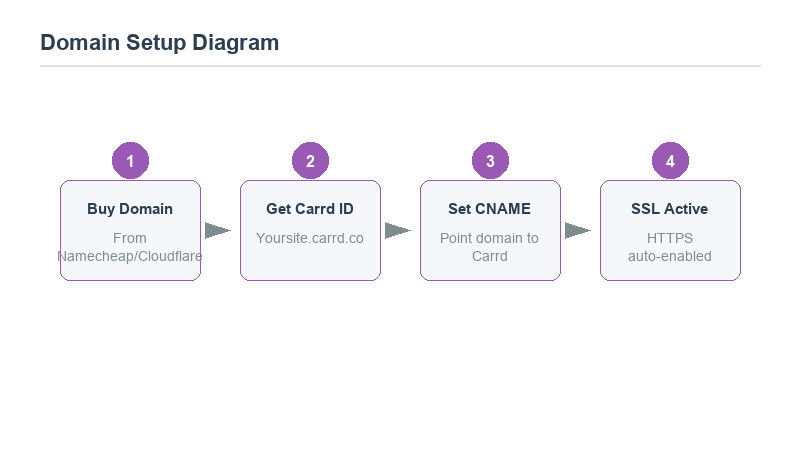
By default, your Carrd site lives at yoursite.carrd.co. For a professional landing page, you'll want a custom domain. In Carrd Pro, click "Publish" → "Change Domain" → enter your domain (e.g., try.yourbrand.com). Carrd gives you a CNAME record to add at your domain registrar (Namecheap, GoDaddy, Cloudflare). Point the CNAME to carrd.co and wait 10–30 minutes for DNS to propagate.
Analytics: Carrd Pro has built-in integration with Google Analytics 4 and Google Tag Manager. Paste your Measurement ID in the Settings → Analytics panel, and you're tracking. No code injection needed. If you're not tracking with GA4 yet, follow our guide on setting up GA4 before you launch—there's no point building a landing page if you can't measure whether it works.
What Carrd Can't Do (and When to Upgrade)
Carrd has hard limits you should know before committing:
No multi-page navigation. You can have a landing page, but you can't link to a "About" page or "Pricing" page from it. If your offer requires more than one page, you need a different tool.
No e-commerce. Carrd has a Stripe payment button, but it's a single checkout link, not a cart. For selling products, use Carrd to land people on a checkout page hosted elsewhere.
No blog. If content marketing is part of your strategy, the landing page drives traffic to your main blog (hosted on WordPress, Ghost, or Notion), not the other way around.
When your landing page outgrows Carrd—usually at 5,000+ monthly visitors or when you need A/B testing—migrate to Webflow or Framer. But for launch, validation, and early traction, Carrd is the fastest path from idea to live page.
Frequently Asked Questions
Is Carrd really only $19 per year?
Yes, the Pro plan is $19/year (billed annually). The free tier gives you a .carrd.co subdomain with Carrd branding. For any professional or business use, upgrade to Pro—the custom domain, form integrations, and analytics are worth the price of a coffee.
Can I edit my Carrd site after publishing?
Yes. Any time you make changes in the editor, click "Publish" again and they go live. There's no draft/published separation—what you see in the editor is what visitors get after you hit publish. Preview changes in the mobile/desktop toggle before publishing.
Does Carrd support SEO?
Basic SEO: you can set page title, meta description, and alt text on images. But Carrd pages are single-page and don't support blog-style content marketing. For SEO, use Carrd as a landing page that captures emails, then drive traffic to your main site for content.