
Your brain is for having ideas, not for holding them. This is the core philosophy behind the Second Brain Note System—a methodology that has transformed how high-performers, students, and creators manage information. If you are drowning in bookmarks, screenshots, and sticky notes, you don't need more storage; you need a system. Specifically, you need a system that leverages a network of notes rather than a folder hierarchy. In this analysis, we will break down the exact mechanics of building a Second Brain, compare the top software tools with real pricing, and give you the honest pros and cons of each approach so you can stop collecting information and start using it.
What is a Second Brain? The Shift from Storage to Synthesis
Unlike a traditional filing cabinet, a Second Brain is a knowledge management system designed to capture ideas and resurface them at the moment of relevance. The term, popularized by Tiago Forte in his book Building a Second Brain, relies on the CODE method: Capture, Organize, Distill, Express. The critical mistake most people make is treating it like a digital dumping ground. Instead, the system forces you to distill every note into a "progressive summary"—a layered approach where the most actionable insight sits at the top. This isn't about hoarding data; it's about reducing the friction between the moment you have a thought and the moment you apply it to a project or decision.
For professionals juggling multiple responsibilities, this system directly reduces cognitive load. When you externalize your memory, you free up working memory to solve problems. The stress of "remembering to remember" disappears, which is a significant factor in managing workplace burnout. If you are currently feeling overwhelmed by information intake, you might also benefit from revisiting your overall Stress Management techniques, as an unmanaged information stream is a silent contributor to anxiety.
The Architecture: Why Links Beat Folders
The technical foundation of a Second Brain is the bidirectional link and the graph view. In a standard folder system, a note can only live in one place. If you have a note about "Remote Team Communication," it either goes under "Work" or "Communication," but rarely both. In a Second Brain, you create a note for the idea, then link it to other notes—like "Meeting Agendas" and "Async Tools." This creates a web of context. When you open a note, you see not just the content, but the entire constellation of related topics you have connected to it.
This architecture mimics how your brain actually works—through association, not alphabetization. When you review a note, the system surfaces "linked mentions" that you may have forgotten about. This serendipitous discovery is where the magic happens. It turns your notes from a static archive into a thinking partner. To implement this, you must adopt a "bottom-up" approach. Instead of planning categories in advance, you let the connections emerge organically. This requires a specific type of tool that supports backlinks natively, which brings us to the software comparison.
Tool Comparison: The Best Second Brain Apps in 2026
Choosing the right software is less about "best overall" and more about "best fit" for your workflow. The market has split into two camps: the "all-in-one" databases and the "networked thought" editors. Below is a comparison of the five most prominent tools, evaluated on their linking capabilities, pricing, and learning curve. We have omitted generic "note-taking" apps that lack the relational database required for a true Second Brain.
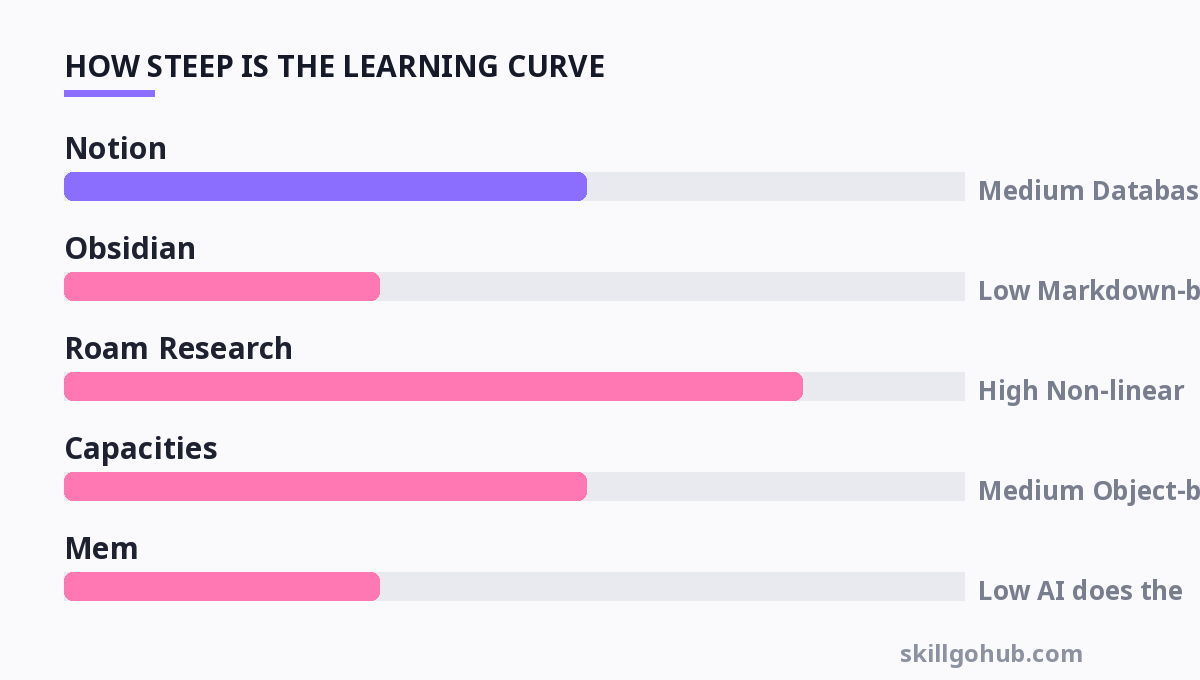
| Tool | Best For | Unique Feature | Pricing (Real) | Learning Curve |
|---|---|---|---|---|
| Notion | All-in-one workspace | Databases & relations | Free; Plus $10/user/mo (annual) | Medium (Database logic required) |
| Obsidian | Local-file power users | Graph view & plugins | Free; Sync $4/mo (billed annually) | Low (Markdown-based) |
| Roam Research | Outliner enthusiasts | Block-level references | $15/mo (billed annually) | High (Non-linear thinking required) |
| Capacities | Object-based organization | Calendar integration | Free; Pro $12/mo (annual) | Medium (Object-based structure) |
| Mem | AI-assisted capture | Automatic contextual linking | Free; Pro $8.33/mo (annual) | Low (AI does the heavy lifting) |
Note: Prices are accurate as of October 2026 and are subject to change. Obsidian's Sync is optional; the core app is free.
If you are looking for a tool that forces you to structure data (like tracking projects or clients), Notion is powerful but can become slow with massive databases. If you prefer privacy and speed, Obsidian's local storage is unmatched. Roam is the pioneer but is showing its age against newer, faster competitors. For those who want zero friction, Mem's AI auto-tags content, but it can feel like a "black box" where you lose control of the organization.
How to Build Your System: The PARA Method in Practice
Once you pick a tool, you need a structure. The most flexible organization system is PARA: Projects, Areas, Resources, and Archives. This is not a topic-based system; it is action-based. A Project is a goal with a deadline (e.g., "Launch Q3 Report"). An Area is a standard of responsibility (e.g., "Health," "Marketing"). Resources are topics of interest (e.g., "Graphic Design Inspiration"). Archives are inactive items from the other three.
The key is to ask: "In which project will I use this note?" If the answer is "none," it goes to Resources. If it's "someday," it goes to Archives. This prevents the "reference file graveyard" that plagues most digital organizers. When you capture a note, you must immediately assign it to one of these four categories. This decision-making process is what separates a Second Brain from a junk drawer. It forces you to evaluate the utility of the information at the moment of capture, which is a high-leverage habit that improves your ability to execute on Learn Teamwork Skills Fast—because clear information flow is the backbone of collaboration.
Distillation: Turning Notes into Actionable Insight
The "D" in CODE stands for Distill. This is the step that most people skip, and it is the reason why their Second Brain fails. Distillation involves highlighting the key points of a note and then summarizing them in your own words. The goal is to create a "progressive summary"—a document that gets more condensed as you revisit it. When you first capture a note, you might copy a full article. Later, you bold the key sentences. Later still, you write a one-sentence summary at the top.
This process is crucial because it forces you to engage with the material. If you merely clip an article and never look at it again, you haven't built a Second Brain; you have built a bookmark list. To distill effectively, use the "Bold, Highlight, Summarize" technique. When you review a note, ask yourself: "How can I make this useful for my future self?" This often means stripping away the fluff and focusing on the why and how. This active engagement is similar to the focused repetition required to Learn Excel Shortcuts Fast—it’s not about reading, it's about doing.
Habits and Maintenance: The 30-Minute Weekly Review
A Second Brain is a living system; it requires maintenance. The single most important habit is the Weekly Review. This is a 30-minute block where you process your inbox, clear out irrelevant notes, and update your Projects list. Without this, your system will decay into chaos within two weeks. During the review, you should look at your "unlinked mentions" (notes that reference other notes but aren't linked) and decide if they need a connection. You should also move completed projects to Archives.
This review is not about reading everything. It is about triaging. The goal is to ensure that the system reflects your current reality. If you are working on a new project, you need to create a folder for it and move relevant resources there. This maintenance is the difference between a tool that works for you and a tool that you "work on." It is a low-effort, high-return habit that ensures your knowledge base remains a source of confidence rather than a source of guilt.
Honest Pros and Cons: The Reality Check
Let's be brutally honest about the downsides. The biggest con is the time investment. Building a networked note system is slow. It takes weeks to develop the habit of linking and distilling. Furthermore, the "graph view" can become a vanity metric—a pretty spiderweb of dots that looks impressive but doesn't actually help you write or think better. Many users spend more time tweaking plugins and themes than actually using the system to produce work.
However, the pros are substantial. Once the system is operational, it drastically reduces the time spent searching for information. It also enhances creativity through "idea recombination"—when you link disparate topics, you often stumble upon novel solutions. The key is to focus on output. If you are a writer, your Second Brain should feed your writing. If you are a manager, it should feed your decision-making. If you find yourself obsessing over the tool itself, you have fallen into the "productivity trap." Remember that the system is a means to an end, not the end itself.
For more, check out: top 10 productivity tools to boost your workflow in 2026 and brain training.
Frequently Asked Questions (FAQ)
Q1: Can I use Evernote or Apple Notes as a Second Brain?
A: Technically, yes, but you will hit a wall. Evernote and Apple Notes are hierarchical and lack robust bidirectional linking. You can use tags to simulate connections, but it becomes unmanageable after a few thousand notes. For a true Second Brain, you need a tool where you can click a link inside a note to see other notes that reference it. Obsidian and Notion do this natively; Evernote does not.
Q2: Is the Second Brain method only for "creative" types?
A: No. It is highly effective for engineers, project managers, and researchers. The core principle—externalizing memory—is universal. For project managers, it serves as a single source of truth for meeting notes and stakeholder requirements. The key is to adapt the PARA structure to your specific fields (e.g., "Areas" might be "Server Uptime" or "Code Reviews").
Q3: What is the difference between a Second Brain and a Wiki?
A: A Wiki is usually a shared, company-wide repository of knowledge. A Second Brain is personal, messy, and optimized for your own thinking patterns. A wiki requires strict governance and structure; a Second Brain is allowed to be chaotic. You should not use a Second Brain tool for team collaboration unless you are using a specific shared space (like Notion's teamspaces).
Q4: How much time should I spend on the Weekly Review?
A: Ideally, no more than 30-45 minutes. If you are spending more than an hour, you are over-organizing. The review should be a quick triage: delete what is irrelevant, link what is related, and update your project list. If you are spending hours, you are likely using the review as a procrastination tool to avoid doing actual work.
Q5: Do I need to pay for a tool to get started?
A: Absolutely not. Obsidian is free for personal use (you only pay for sync or publishing). Not
Get one practical tool tip a week
Short, useful, no spam. Unsubscribe anytime.