
You don’t need a four-year degree or a $10,000 bootcamp to start building websites. The barrier to entry has never been lower. However, the sheer volume of tools, frameworks, and advice available online can paralyze a beginner. This guide cuts through the noise. We’ll focus on the foundational pillars of web design—HTML, CSS, and basic UX principles—and show you exactly where to invest your time and money (if you choose to spend any at all). By the end, you’ll know how to structure a page, style it effectively, and avoid the rookie mistakes that scream "amateur."
Why "Design" Means More Than Pretty Colors
Before you write a single line of code, you need to shift your mindset. Web design is not about making something look "nice." It is about solving a problem for the user. A beautiful site that takes ten seconds to load or has unreadable text is a failure. Conversely, a bare-bones site that loads instantly and guides the user to a purchase or inquiry is a success.
When you start learning, focus on three core principles:
- Hierarchy: The most important element on the page should be the most visually dominant. If your headline is smaller than your footer text, you have a problem.
- Whitespace: Empty space is not wasted space. It gives the eye a rest and increases comprehension.
- Consistency: If your buttons are blue and rounded on page one, they cannot be green and square on page two. Consistency builds trust.
This mindset will guide every technical decision you make. It’s also the reason why many developers struggle to code but succeed in design—they understand the "why" behind the layout. If you want to sharpen your logical approach to problem-solving, which is crucial in design, check out this guide on Learn Critical Thinking to apply structured reasoning to your layouts.
The Non-Negotiable Trio: HTML, CSS, and JavaScript
You cannot avoid these three. They are the building blocks of the web. Here is the blunt truth about each one:
HTML (HyperText Markup Language) is your skeleton. It defines structure—headings, paragraphs, images, links. It is not a programming language; it is a markup language. You are labeling content. The biggest mistake beginners make is using HTML for styling (e.g., using <center> or <font> tags). Stop that immediately. HTML is for structure only.
CSS (Cascading Style Sheets) is your skin and clothing. It controls layout, colors, fonts, and responsiveness. This is where "design" actually happens. You will spend most of your early learning time here. Focus on the Box Model (margin, border, padding, content) first. If you don't understand the box model, you will fight with spacing every single day.
JavaScript is your muscles. It adds interactivity—sliders, form validation, dynamic content. You can build a functional, beautiful website with just HTML and CSS. You cannot build a truly interactive web app without JavaScript. For a total beginner, learn HTML and CSS for two weeks before touching JavaScript. Trying to learn all three at once is like trying to juggle while riding a unicycle—you will fall.
Here is a practical tip: Use the "Inspect" tool in your browser (right-click any page and select "Inspect"). This shows you the live HTML and CSS of any website. Reverse-engineer a simple site you like. Copy the structure, break it, fix it. This is the fastest way to learn.
Choosing the Right Tools: A Realistic Comparison
You do not need expensive software to start. In fact, you can begin with just a text editor (like Notepad) and a browser. However, as you progress, the right tools save you hours. Below is a comparison of the most common tools for a beginner, with real pricing structures. Note that "Free" often means a limited tier, not a trial.
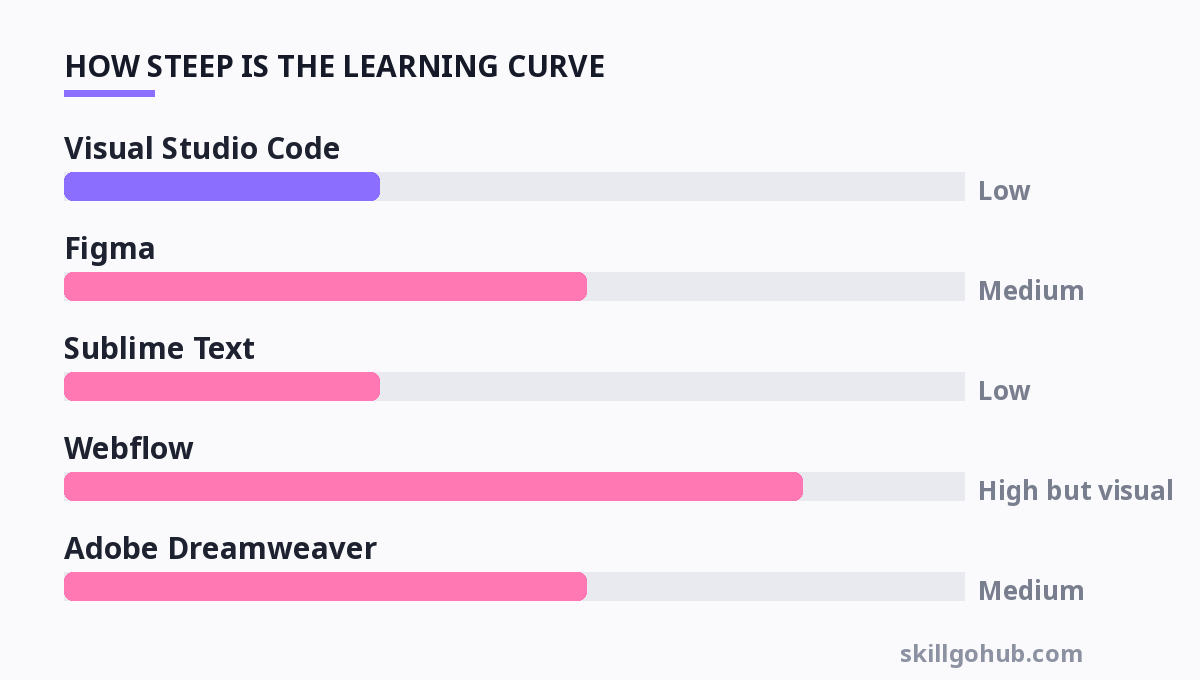
| Tool | Type | Best For | Pricing Model | Learning Curve |
|---|---|---|---|---|
| Visual Studio Code | Code Editor | Writing HTML/CSS/JS with intelligent autocomplete | Free (Open Source) | Low |
| Figma | UI/UX Design Tool | Designing the layout visually before coding | Free (Starter) / Pro at $12 per editor/month | Medium |
| Sublime Text | Code Editor | Lightweight, fast editing on older computers | Free to evaluate (License $99) | Low |
| Webflow | Visual Development Platform | Building and hosting sites without writing code manually | Free (Starter with branding) / Basic at $14/month | High (but visual) |
| Adobe Dreamweaver | Code & Visual Editor | Legacy code editing with live preview | Subscription only, $22.99/month (part of CC) | Medium |
| Notepad++ | Code Editor | Windows-only, minimal distraction editing | Free | Very Low |
My honest take: Start with Visual Studio Code. It’s free, has a massive extension library (like "Live Server" which auto-reloads your page), and is the industry standard. Avoid Dreamweaver—it’s overkill and hides the underlying code, which prevents you from learning. If you are a visual thinker, Figma is excellent for mockups, but do not use it as a crutch to avoid learning CSS. The code is the final product; the design tool is just a sketch.
Mastering Responsive Design: Mobile-First Is Mandatory
Over 60% of web traffic is mobile. If your site looks broken on a phone, you are invisible to the majority of your audience. Responsive design is not a "feature" anymore; it is the default requirement.
The core concept is simple: use flexible grids and media queries. A media query is a CSS rule that applies styles only when certain conditions are met (like screen width).
Here is the rookie mistake to avoid: Designing for a desktop screen (1920px wide) and then scaling down. Instead, design for the smallest screen first (320px) and scale up. This forces you to prioritize content. What is essential on a phone? The headline, the call-to-action, the contact info. Remove the fluff.
Practical implementation steps:
- Use relative units (
em,rem,%) instead of fixed pixels for font sizes and widths. - Add the viewport meta tag to your HTML head:
<meta name="viewport" content="width=device-width, initial-scale=1.0">. Without this, mobile browsers will render a zoomed-out desktop version. - Use CSS Flexbox or Grid for layouts. They are far more adaptable than the old
floatmethods.
Test your site by resizing your browser window continuously. If you see a horizontal scrollbar, you have an overflow issue. Fix it immediately. A disciplined approach to learning these fundamentals pays off. Just like building good habits, consistency matters more than intensity. If you struggle with staying consistent in practice, read up on how to structure your day effectively with Evening Routine Habits to ensure you get dedicated coding time.
Typography and Color: The Silent Communicators
You can have perfect layout and spacing, but if your typography and color palette are off, your design will feel "cheap." You don't need to be an artist, but you need to follow rules.
Color Theory (The 60-30-10 Rule): Use 60% of a dominant neutral color (white, grey, beige), 30% of a secondary color (your brand color), and 10% of an accent color (for buttons and highlights). This creates balance. Use tools like Coolors.co or Adobe Color to generate palettes. Never use pure black (#000000) for text on a white background—it causes eye strain. Use a dark grey like #333333 instead.
Typography: Limit yourself to two font families maximum—one for headings and one for body text. Use Google Fonts (free) to find them. For body text, ensure the line height is at least 1.5 (150% of the font size) to improve readability. For headings, aim for a font weight of 700 (bold) to establish hierarchy.
A quick test: Stand three feet away from your monitor. Can you still read the headline? If not, it's too small or too light. Accessibility is not just about color contrast for the visually impaired; it is about clarity for everyone.
Launching, Hosting, and the "First Draft" Reality
You have built a local HTML file. Now what? You need to put it on the internet. For a beginner, do not buy a $200/year hosting plan immediately. Use free static hosting services like Netlify or Vercel. They allow you to drag-and-drop your folder and get a live URL in seconds. This is a massive confidence boost.
Here is the hard truth about launching: Your first site will be ugly. It will be imperfect. That is okay. The goal of your first project is not perfection; it is deployment. You need to experience the full loop: write code, push it live, share the link, get feedback, iterate.
Focus on building a simple one-page portfolio or a landing page for a fake business. This forces you to handle a hero section, a features grid, and a contact form. Do not use a template for this first project. Write the code from scratch. It will be slower, but you will learn ten times more than if you just tweaked a downloaded theme.
As you move into more complex business logic, you’ll realize that design and data go hand-in-hand. Understanding basic financial constraints is also vital if you plan to freelance. If you are designing for clients, you need to understand their business models. A quick primer on Learn Accounting Basics Fast can help you price your services and understand client terminology.
For more, check out: top 10 productivity tools to boost your workflow in 2026 and learn graphic design basics.
Frequently Asked Questions
How long does it take to learn web design basics?
You can learn the syntax of HTML and CSS in about 3-4 weeks with 1-2 hours of daily practice. However, learning to design well—understanding layout, spacing, and user flow—takes 3 to 6 months of consistent project building. The syntax is easy; the application is hard.
Do I need to learn JavaScript to be a web designer?
Strictly speaking, no. You can design static websites with just HTML and CSS. However, if you want to create interactive elements like animated menus, form validation, or dynamic content, you need JavaScript. Many "designers" know enough JavaScript to implement libraries like jQuery, but a deep understanding is usually reserved for developers.
Should I use a website builder like Wix or Squarespace instead?
If your goal is to launch a simple business site quickly, use a builder. If your goal is to become a professional web designer or developer, avoid them. Builders lock you into their ecosystem and prevent you from learning the underlying code. They are a dead-end for a career, but a valid tool for a business owner.
What is the best way to practice web design?
Recreate existing websites. Pick a site like a local restaurant or a portfolio page. Try to replicate it pixel-perfectly using HTML and CSS. Do not look at the source code; try to figure it out yourself. This "reverse engineering" is the most effective drill known to self-taught designers.
Is web design a good career in 2026?
Yes, but the field has split. Pure "web design" (making things look good) is becoming commoditized by builders. The high demand is for "design engineers" or "front-end developers" who can both design and code complex interactions. If you learn the basics outlined here and then push into CSS animations and modern JavaScript frameworks, you will be highly employable.
Get one practical tool tip a week
Short, useful, no spam. Unsubscribe anytime.